Blog

Godot

Atomic Ferry’s training

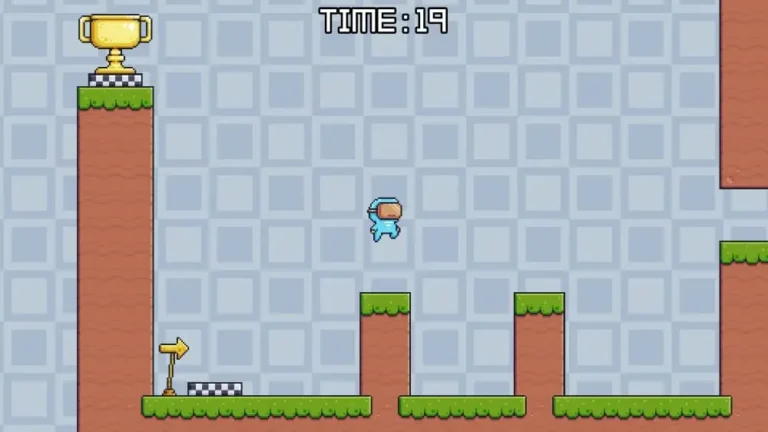
The past june I decided to work on game dev projects on my own, both for building portfolio and getting practice. However, I had some friends interested in game dev with programming knowledge, so I asked them and they wanted to participate. Asking some more, we ended up with 5 members and a name: Atomic Ferry. I took the role of product manager, and for the first project, every member of Atomic Ferry would take part in a Gamedev.tv course about Godot. The course was divided in 3 projects during which we would learn the fundamentals of Godot. To spice things up, I asked every member to, once they finished a project, go freestyle and add some more to it, whatever they feel like. During this article, I’m going to go through each project and what each member of Atomic Ferry added to them. Speedy Saucer The first project in the course was Speedy Saucer, a physics-based game where the player has to navigate through a maze. The main appeal of the game is its difficulty managing the speed of the disc you control to not crash. Speedy Saucer was the base for the rest of the course. This is where we learnt about the different types of Nodes, Rigidbodies and GDScript’s fundamentals. Nothing revolutionary, but it was good to get the hang of the UI and the peculiarities of GDScript. Since this was the first and simplest project, some people wanted to show off and do a whole other game. This is what each member of the team changed: You are able to check out the code and the project of each member’s version of Speedy Saucer here. Alien Attack The second project was Alien Attack, a classic bullet-hell where the player has to avoid and shoot down enemy ships that appear on the right. In Alien Attack, the main thing we learnt about were entities and instantiations, used in the many enemies and projectiles it uses. Here we also learnt how to implement UI, sprites and particles. We also learnt about signals, a complete game changer. This is what each member of the team added to the base game: You are able to check out the code and the project of each member’s version of Alien Attack here. Martian Mike The final project of the course was Martian Mike, a simple 2D platformer where you have to navigate through obstacles and platforms to get to the goal before the timer goes out. Martian Mike was mostly about using already learnt elements of Godot and level up. However, there were a lot of new things too, like how to use sprite sheets, animations and tilemaps. This is what each member of the team added to the base game: You are able to check out the code and the project of each member’s version of Martian Mike here. Afterwards Embarking on this project with my friends was both exciting and scary. Some of them were still in college and the rest of us were working, so eventually the hype died until we stopped. However, it was a great experience making fun projects with my colleagues, learning alongside them some Game Engines. I still have to find a team to collaborate with in Game Jams, but this was a great experience that has helped me greatly to improve my confidence developing games. Plus, it was fun while it lasted.

Read More →
Uncategorized

New Home’s Post-Mortem

In 2024, I finally decided to take a shot at my dream job and started studying Game Design in Level Up. I took a bootcamp where I learnt the basics of Game Design, and for the final project we had to design our own game from scratch and develop the document designs needed for a first preproduction phase. Finally, as the last task, we had to pitch our game to our colleagues and partners of the academy. In this article, I will be doing a post-mortem of my game, New Home, analyzing what went well, what I could have done better and then reflecting on how I have evolved as a Game Designer since then. Credits to: Daniel Clarke Conceiving New Home Before deciding on a game to develop, we had a preliminar task of developing a One-Pager of our ideas where we pitched a very brief and streamlined concept in order to get feedback from our colleagues and deciding on a final idea. We had to describe the core mechanics, progression and aesthetic; as well as how the game would be played. We also had to pitch the idea as it would be presented to a stakeholder, so we also had to touch on selling points and develop a market study. You can see the One-Pager in here (please be kind to my sketch, I was trying my best to present how the main camera would look like). New Home wasn’t my intended idea. It was actually conceived to make an opposition to the game I intended to make called Escape the Dark. However, when I practised both pitches with my friends, they seemed to like more New Home, so I started to actually think about it and I liked the idea. New Home was conceived as a AA game, so I wouldn’t be able to do it nowhere in the near future due to its scope. However, taking on a big challenge as my first task as a Game Designer sounded good, not because I thought I could make it, but rather because I would hit all the bumps in the road on my first go so I knew what to expect the next time. The pitch day came, and unsurprisingly, New Home gave a better impression. So it was settled. I was going to conceptualize a AA game as my first shot as a Game Designer. My first High Concept Document Then we started the process of developing a High Concept Document for our games. We had to deliver the HCD plus two additional documents that would be helpful for the preproduction of our game, which in New Home’s case were a Level Design Document for a first level that would showcase every aspect of the game loop and a balance document on how the enemies’ stats would look like. We had a template we could follow, so I went on with it. Some of the highlights on this High Concept Document are: But definitely, the part that helped the most was laying out the entire Player Journey. This not only helped me greatly to define the scope, tie up the narrative and emotional flow and defining the rhythm of the progress; but also made it seem like a real project, something that could actually be made. Thanks to this experience, building up the Player Journey is one of the first deliverables I make in my projects in order to envision it and validate the idea. Level Design One of the highlights of New Home is its iterative progression, where the players have to go on incursions to different biomes and going back to the settlement once they get defeated in order to upgrade and replenish their resources. So I had to create a concept level where this progression could be showcased. The result was this Miro document where I layed out the specific of this level. Except one thing that now I can see its missing from the template, which is a thourough explanation of the flow of the level. I am missing symbol and color legends to interpret the layout, a showcase on how the player would navigate the level and an explanation on the reasoning for some of these decisiones. Fortunately, I still remember what everything is supposed to be, so I will explain it here: There are still a lot of things that are missing from this explanation, and much more important the reasoning behind them. So yeah, that was a miss. However, I still really like the idea behind this level. There are a lot of nuanced elements, such as getting access to shortcuts in a biome by progressing in other or having to go through the first enemies in the level to get to the biggest shortcut to force advanced players to see how much they have progressed. The design is very cool, and I think I did a good job designing it. If only I wrote it down… Pitching New Home I have to say, I wasn’t exactly a spokesman. I usually got very nervous and had to memorize the entire pitch because I would ramble if not, but since I wanted to get it out as quickly as possible, I spoke very fast. Plus, there were a lot of techniques that I wasn’t even aware of that could have greatly improve my presentation, such as making eye-contact with the camera or putting GIFs on the presentation. Needless to say, it didn’t go as great as I would have liked. However, it went good enough. My colleagues and teacher knew how much effort and dedication I put into it, and I was very happy on the result. But actually, I had a rematch on the pitch when, almost a full year later, Level Up contacted me to make a video for their Demoday explaining my experience while studying with them and, of course, talking about New Home. It wasn’t exactly a sales pitch, but I am far happier on my results on that presentation. I still have a lot of room to improve, but I’m getting better and better. You can check it out here: Feedback of my colleagues and

Read More →
Uncategorized

What I like about Godot

The first step in every Game Dev’s career is to stalk their favourite company’s web page searching for an entry-level position with 0 years of experience needed. Then, after realizing that they actually have to do something in order to work in the industry, the real first step is to choose a Game Engine to spend whole afternoons working with and crying over it. That’s why it’s important to try as much as you can. Whether they already have programming skills or they have to start from the beginning, picking up a Game Engine is a big task for a Game Dev. People have many reasons for choosing one over others, like having experience with the programming language, a friend or influencer recommending it or because their favourite game was made with it. In this post, I’m going to get through the reasons I like about Godot and then decide if I will be using it from now on for my personal projects. Cross-Language Scripting The first thing that caught my attention about Godot is how cross-language friendly it is. By doing some black magic, you can essentially do that in every Game Engine, but the fact that Godot actually promotes it peaked my curiosity. Thanks to my Computer Science degree, I can work with every language that Godot officially supports and interchange them as convenient. I want to work with a high-level programming language for most of my scripts to agilize the process and improve the readability, while also having the option of changing to a lower-level language to implement some resource-heavy algorithm or subroutine. I know I won’t be making any of that in the near future, but knowing that I can gives me the freedom and confidance I need to embark on new projects. GDScript Talking about programming languages, I have to say that I have completely fallen in love with GDScript. My go-to programming language for almost any kind of project has always been Python due to its simplicity. GDScript has a lot of similarities with Python, such as the dynamic typing, use of indentations and general philosophy; while being influenced by other languages such as C# in things like its use of decorators and Object-Oriented programming. I am currently working as a Software Engineer where I mostly use C# so I am used to it, and I have studied and utilized the advantages of C++. But I will keep using GDScript for now because by the time I write all the necessary keywords, parenthesis and brackets to declare a simple array in C#, in GDScript I’ve already made a for loop that iterates over that array to apply an algorithm to every element in a legible way. Signals When I first learnt about signals, I thought that it was going to be the hardest thing to learn; but after using them, now I want every programming language to implement it as smooth as Godot due to how organic it feels to use. Following a Publisher-Subscriber pattern, connecting and emiting signals makes so much sense. When an event happens, you simply emit the signal and every node connected to it reacts accordingly. I can see signals becoming really messy in medium to large projects because you have to remember which signals you have connected via code or the UI as well as to which methods are connected to, but it probably becomes a lot easier to maintain if you keep record in a diagram. Remember to use diagrams alongside the documentation to improve the readability and maintenance, folks. UI and IDE Godot is actually not my first Game Engine, it was Unity. I had been using it for some years from time to time, and I have done some projects on it. But due to Unity’s fiasco with its terms and conditions last year plus some issues I had working with it, I wanted to try other Game Engine for my professional career. However, one thing that I liked about Unity was its UI, and Godot’s is almost identical, if not better in some ways. Being able to seamlessly change between nodes and modifying their attributes is something I appreciate. Plus, I really like that the IDE is integrated withing Godot’s UI. I despise Visual Studio which was the default option for Unity, and while I like working in VS Code and appreciate how customizable it is, I prefer the simplicity of having the IDE inside the UI. No reloads needed, no waiting for the application to open, no need to install additioanl plugins… But by far the best thing about it is how seamless debugging is. You simply put the breakpoint in the code and start the game. That’s it. Honorable Mentions Conclusions Godot is still a relatively new Game Engine, but it has already formed a big enough following of people using it that it doesn’t feel that way. With the amount of resources available online, new and old indie devs developing games with Godot and overall simplicity, I really like Godot and will keep using it in the future alongside other Engines if needed.

Read More →
Uncategorized

How I work in Hidalgo

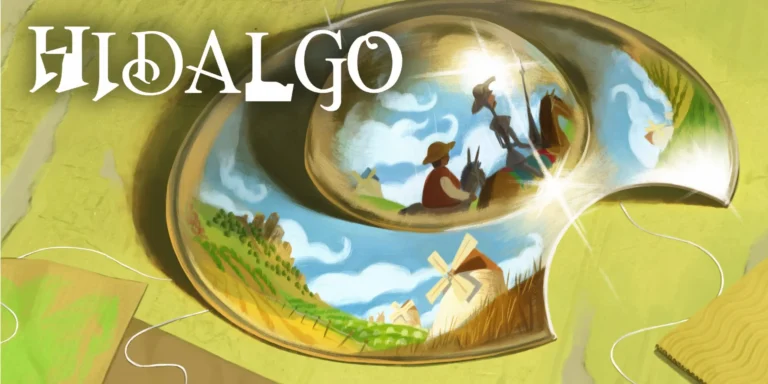
From the past may, I have been working alongside Infinite Thread Games in its upcoming game Hidalgo, a cozy narrative-adventure game based on the popular novel «Don Quijote de la Mancha». Hidalgo is my first serious game dev project, and it is a blast. Creating content for this game is a unique and fun experience where I have to take references from the original work and then give it a fun twist to fit the maquet style. And that’s what I’m going to talk about in this article. The process I follow from being assigned the task of working in a new level to the implementation in the project. Follow what is already planned Hidalgo was originally conceived by Roger Montserrat, director of Level Up – Game Dev Hub, and alongside Juan Pablo Guzmán, CEO of Infinite Thread Games, they made the first draft of Hidalgo’s GDD that included the whole Player’s Journey, the document where it is established at a high-level the whole game. This document is not set in stone and may change in the future, but for now we are following it religiously. So, the first step in my pipeline is to check out the Player’s Journey and talk with either Roger or Juanpy to take in their original ideas. They usually have already in mind some kind of puzzle or mechanic unique to each segment of the game, so I listen to them to be sure to include their ideas in my work. Go and grab a book One of the main selling points of Hidalgo is that it is based on «Don Quijote de la Mancha» both in its setting and stories. So of course, I need to check out the original novel before everything else. Fortunately, each segment in the game references specific passages on the novel, so I can just jump into the relevant chapters. After finding which chapters I have to read, I open the book and start reading them. I usually do a couple of reads to ensure I understood everything correctly, and then look online for profesional interpretations from people expert in the subject to get a better grasp at the context. Then, once I have fully soaked in the chapter, I begin listing every important theme, events and other elements that must be in my work to faithfully represent the passages. And then, and only then, I begin brain-storming. Brain-Storming This is the fun part. Once I have an stablished list of essential elements and Roger and Juanpy’s ideas, I can let my imagination flow to find creative and unique experiences to our game. I often get inspired by mechanics I have seen in other games, but one of the quirks of working in Hidalgo is that every idea must be passed through a kid filter. Everything must look like a toy or made by a child. For this, I usually get inspired by my childhood, and it usually leads to a nostalgia trip looking for specific toys I played with. I also have to take into account other factors, like the reusability of the new assets, the complexity or even localization issues. Once I have the concept and justification that sound fun, I begin working on the mockups. Mockups I have to say, I’m not an artist. I have always hated drawing stuff because I lack the vision to transfer what I imagine to the paper. But during my time at the Game Design and Conceptualization bootcamp, I learnt how important it is to communicate well your ideas to the team. It didn’t have to be good, it had to be understandable. I still have to try and follow art principles like perspective and proportions, but I’ve won the battle against my fear. I draw horrible and I seriously need to take some classes, but my ideas are well communicated, and that is a win in my record. Once I have my mockups, I am ready to present my idea to the team. Revisions I usually present my work during our weekly meetings, where we dedicate time to show and discuss our work. These are the most important moments in my job, listening to everyone opinions and thoughts. My best works have always come while discussing with my colleagues, when they offer their suggestions. At minimum, I get new and exciting moments to include in each segment, and at best, my original idea evolves into a great one. I have to say, I am very lucky to work alongside the rest of the members of Infinite Thread Games because they are some of the most creative and hard-working people I have ever met. From here, I usually go back to the drawing board to mockup the new ideas, and then present them again. Once the base is solid, I begin collaborating with the involved members to create Concept Art, developing the code and creating the required assets. I provide them with documentation that ranges from high-level like storyboards or more mockups to lower-level such as State Machines or Flow Diagrams. Seeing the Results I didn’t know how rewarding it felt to see your ideas come to life until I felt it myself. I have already made some solo projects, but they are nothing compared to seeing the results from collaborating with other talented people over many iterations. I hope that you get at least a quarter of my happiness when playing Hidalgo, because then I would have made a good job. But I don’t have to imagine, because some of the stuff I have been working on are going to be seen very soon! So stay tuned!

Read More →

Ese Isma se merece una ola con la ola y la ola que precede a la ola y que antecede a la ola

© 2026 Isma P Nieves. All rights reserved.